4.2.20. Roller hemming data
4.2.20. Roller hemming data
This displays the roller hemming squeeze and the adjustment distance when the roller hemming function is used.
Can be used by selecting『[F1]: Service』→『1: Monitoring』→『22: Roller hemming data』.
The roller hemming function can be activated by setting the function as “Enable” in 『[F2]: System』→『4: Application parameter』→『12: Roller hemming squeeze control』
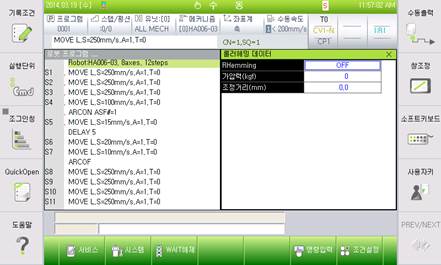
Figure 4.54 Roller hemming data

l For more details, refer to『Hi5a Controller “Roller Hemming Squeeze Control” Function Manual』.