4.7.1. Record condition
4.7.1. Record condition
You can change the condition recorded for various steps within the program to create the same or new program.
(1) Select 『[F1]: Service』 → 『6: Program conversion』 → 『1: Record condition』.
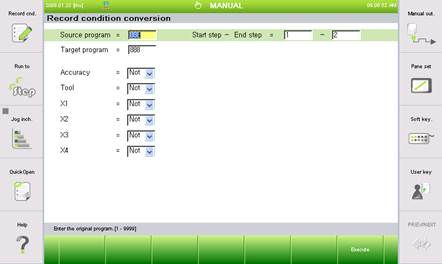
(2) Execute with 『[F7: Execute]』key after changing the condition.
n Source program : Number of the source program to change the condition of
n Target program
Number of the target program to save after changing the condition
If the number is the same as that of the source program, it will be overwritten.
n Start step ~ End step
Range of steps to change the record condition. (Default value 1~ End step)
n User sets the conditions including accuracy, tool, X1, X2, X3 and X4 condition from the start to end step.