4.6.4. Rename folder
4.6.4. Rename folder
You can rename the folder.
(1) Set the focus on the folder tree window and select the folder you want to rename by moving the cursor.
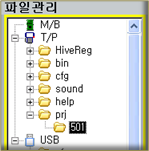
Figure 4.96 Selecting a folder to rename
(2) When you press the 『[F5]: Rename』key, the folder name will switch to edit condition.
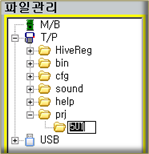
Figure 4.97 Editing the folder name
(3) When you are entering only the numbers, you can use the [SHIFT] + [<=] [=>] key to move the cursor and use the [Backspace / DEL] and number keys to rename the folder. When you press the [ENTER] key, the edit will be completed.
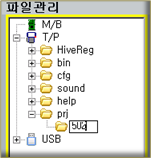
Figure 4.98 Folder name editing completed
(4) When you have to enter characters besides numbers, press the [Soft keyboard] key in the edit condition of the folder name and use the soft keyboard to edit the name.