4.8.1.3. Teach pendant single version update
4.8.1.3. Teach pendant single version update
(1) Every time you press the 『[F4]: Refresh』key, the software file name for teach pedant at the bottom of {USB}/hi5a/bin/ will be displayed in order. (When all file names are displayed, it will return to batch version update mode.)

Figure 4.124 T/P single version
(2) When you press [SHIFT]+『[F4]: Refresh』, you can switch to the sub folder. Every time you press the 『[F4]: Refresh』button in this condition, the file name of the applicable sub folder will be displayed in order.

Figure 4.125 T/P information in sub folder
(3) After checking by pressing the [ENTER] key, press the『[F2]: Ver. up』to execute single version update by using the indicated file.
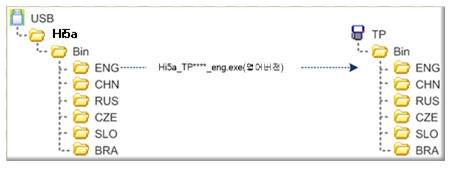
Figure 4.126 Single T/P version update