5.3. Selecting a channel of the RS-232C port for connection with SyCon
5.3. Selecting a channel of the RS-232C port for connection with SyCon
SyCon can communicate with only 1 fieldbus module through the RS-232C cable. Therefore, before executing SyCon, the RS-232C port of BD52x should be connected to a channel where a fieldbus module is mounted.
Let’s assume that we are trying to connect SyCon to a fieldbus module that is connected to channel 3.
(1) Select 『[F2]: System』 → 『2: Control parameter』 → 『2: Input/Output signal setting』 → 『10: BD52x fieldbus information』from the menu.
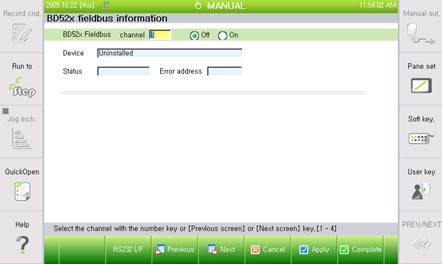
Figure 5.3 BD52x Fieldbus information and setting screen
(2) Press 『[F4]: Next』to move to the Channel No. 3 screen.
(3) When you press 『[F2]: RS232 I/F』button in the status window, the RS-232C port will be connected to the channel that is currently selected, which is Channel No. 3.
(4) 7-segment mounted on the side of BD52x board shows the number of the channel to which RS-232C is currently connected, so the Channel number can be confirmed in this way.