8.5. R18Counter register display/settings
8.5. R18Counter register display/settings
This function allows the content of the counter register to be checked and edited.
Following screen is displayed if pressing the [R..(NO)] key → [18] → [ENTER (YES)] key.
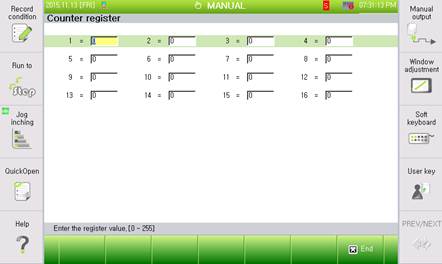
Figure 8.5 R18 Counter register display/setting screen

l This cannot be used while the robot is in operation.
l The value displayed on the screen is the counter currently set for the number of times.
l This is same function as 『[F1]: Service』 → 『2: Register』 → 『5: Counter register』.