4.4. Timing belt check
4.4. Timing belt check
The wrist axis drive part is driven by a timing belt. When it comes to the timing belt driving, check the belt tension after every 1,500 hr or when vibration/noise occurs. Improperly tensioned timing belts may have a significant negative impact on the performance of the robot.
n Checking the timing belt
① Turn off the power.
② Remove the wrist cover.
③ Place the microphone of the sonic belt tensioner on the belt opposite to the idler and apply impact to the belt.
④ Check the tension frequency value.
⑤ If the tension frequency value is outside the tension frequency range in the table below, loosen the idler bolt a little bit.
⑥ Rotate the idler to adjust the timing belt tension and fasten the idler bolt (340 kgfcm).
⑦ Check the tension frequency value again and repeat the above steps ⑤ ~ ⑥ to ensure that the tension comes within the tension frequency range in the table below.
⑧ Assemble the wrist cover.
⑨ Turn on the power.
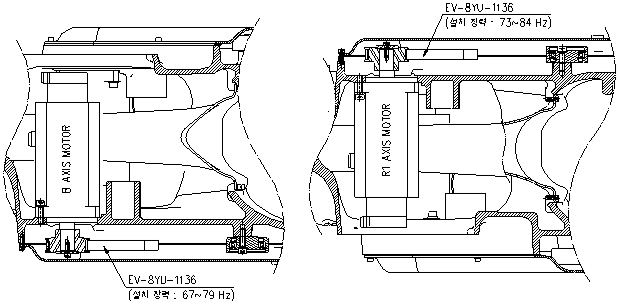
Figure 4.2 Timing belt tension check area
Table 4‑4 Timing belt tension
| B axis | R1 axis |
Tension range | 67 ~ 79 Hz | 73 ~ 84 Hz |