2.3. Programming
2.3. Programming
Prepare a job program to apply the function of driving parts anomaly test.
Programming instructions
(1) Write the step to start the test.
Set the Accuracy at 0 (A=0) for the step to start the test.
(2) Next to the step to start the test, insert the command for driving parts anomaly test.
※ Refer to the following example of programming:
Command for driving parts anomaly test (DrvTest).
This is the command for starting the robot's operation for driving parts anomaly test.
You can prepare a test program easily by selecting and adding [Enter command] → [DrvTest.ACT] to the job program.
Example of programming
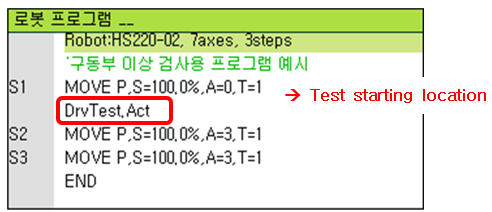
Figure 2.2 Example of programming for driving parts anomaly test