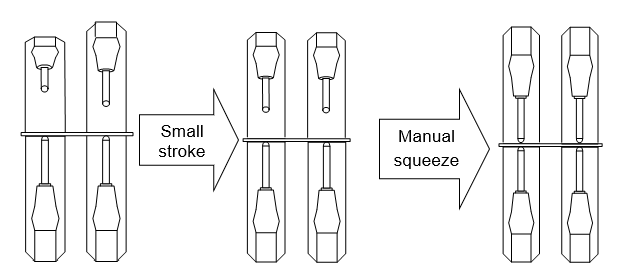
3.4. Manually opening and closing the welding gun, and manual squeeze
3.4. Manually opening and closing the welding gun, and manual squeeze
The procedure for manually opening and closing the welding gun and performing manual squeeze is as follows.
(1) Confirm the manual mode. Make preparations for operating the servo-gun axis if the servo-gun is used.
(2) Select the gun number for manual open and close or squeeze. The gun number is selected as follows:
Single-gun | For welding gun change | R358 (Welding gun connection/disconnection) |
Not for welding gun change | R210 (Welding gun selection) | |
Multi-gun |
| R214 (Simultaneous welding gun selection) |
(3) Confirm if the following [user] key is registered.
Servo-gun | Air gun | |||
large stroke | Small stroke | Manual squeeze | Manual open and close | Manual squeeze |
|
|
|
| [GUN] key (Provided in key pad) |


(4) By pressing “[SHIFT] and [user]” key together, the movement described below will be carried out. If multi-gun is selected, all guns will be operated in a uniform manner.
Servo-gun | Air gun | |
| Manual open and close | Manual squeeze |
Opening and closing air gun (X1 ~ X4) Output assigned signal | Executing welding process (W1 ~W4) Output assigned signal
Welding condition (W1~W4) Output assigned signal | |
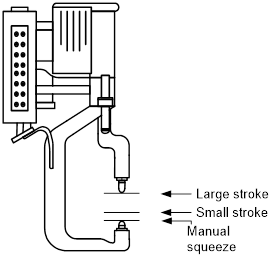
If using the servo-gun, the gun will display the following characteristics at the time of manual open/close and squeeze operation.
l If this stops automatically with the large stroke position, the small stroke position and the squeeze force set value are reached.
l The moving speed is 『2: Step fwd/bwd max. speed』 of 『[F7]: Condition setting』.
l Set the appropriate squeeze force, as the operation will not be successful if the set squeeze force is too small. (R211: Squeeze force setting)
l When using multi-gun mode with different moving distances for the two guns, the gun that arrives first will be stopped, and the other gun will be stopped after moving the remaining distance.