6.2. Embedded DeviceNet Master IO Monitoring
6.2. Embedded DeviceNet Master IO Monitoring
The IO data (FN signal) of the embedded DeviceNet master can be monitored.
(1) Select “[F1]: Service” → “1: Monitoring” → “7: PLC Relay data” item.
Select “1: PLC X Relay (external input)” for input and “2: PLC Y Relay (external output)” for output.
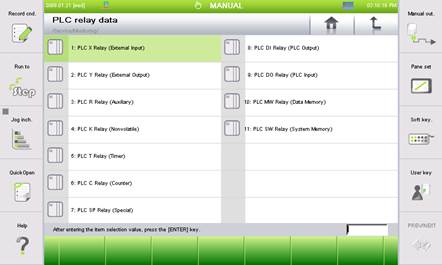
Figure 6.5 Embedded DeviceNet master IO monitoring menu
Press the “[F1]: Node status” button to go to the embedded DeviceNet master diagnosis screen.
Press the “[F3]: X/Y” button to interconvert input data or output data.
Press the “[F4]: Trace” button to monitor the IO data of a specific slave.
Press the “[F5]: Display type” button to change the data display type.
Press the “[F6]: Prev FN” button to monitor the slave IO data of the previous node number.
Press the “[F7]: Next FN” button to monitor the slave IO data of the next node number.
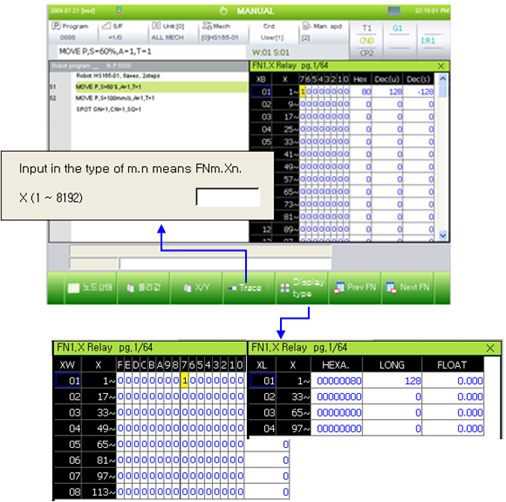
Figure 6.6 Embedded DeviceNet master IO monitoring screen