8.2. Registering External Axis
8.2. Registering External Axis
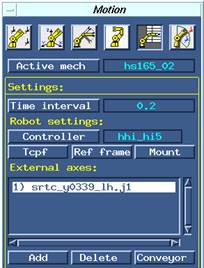
Figure 8.3 Registering servo gun axis as an external axis
To use the servo gun, the servo gun axis should first be registered as an external axis of <Active mechanism>. Click the [Add] button and select servo gun axis mounted as external axis of robot under the <Settings> tab in the motion dialog box, as shown in [Figure 8.3].
Teach pendant determines the external axis number of servo gun and determines whether it is a servo gun or not by comparing the gun name set by the user clicking the [Const] button and the external axis. The sequence of registering the external axis should be the same as the sequence of registering for a gun that is registered from Const.
NOTE Local location and global location
The Hi5 controller can control up to 6 external axes. External axes should be registered in the following order. 1) Drive, 2) Servo gun1, 3) Servo gun2, 4) Jig
These axes can be used provided that correct order is used. For example, if there is no drive axis, external 1 axis will be started from servo gun. |