2.8.1. User key assignment
2.8.1. User key assignment
The user assigns a specific key to F1 ~ F7 of teach pendant. To automatically assign the keys depending on the task usage of spot/arc/palletizing, refer to 『[F2]: System』 → 『5: Initialize』 → 『3: Usage setting』.
(1) Press the [SHIFT] + [User key] button to enter this function.
(2) Select the F key to assign using the direction key ([Ü/Þ]).
(3) Select the function to assign using the direction key ([Ý/ß]).
(4) When you press the 『[F1]: Selection』 key or [Enter] key, you can assign the function you selected to the F key.
(5) When you press the 『[F2]: Delete』key or select the “No. 0: Cancel setting” item, you can reset the allocation of the selected F key.
(6) When you press the 『[F7]: Complete』key, the setting will be saved.
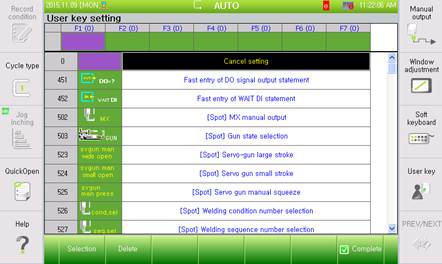
Figure 2.46 User key setting screen