2.2. Program Reservation Execution Register
2.2. Program Reservation Execution Register
The program reserved execution register is used to check, modify, insert, or delete a reserved program, and can be found in [/Service/Register/Program Reservation Execution]. There is no special SAVE button for this register. Press ENTER key to save this register
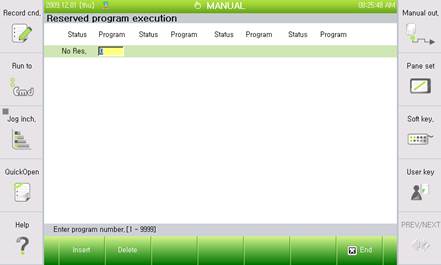
l Changing the program number
To change the reserved program at the current position, enter a program number in the reservation register number field
l Insert (F1)
Press F1 and enter a program number to reserve a new program in the next position
l Delete (F2)
Position the cursor on the reserved program number to delete; press F2 to display Yes/No message box; and select Yes to delete the program number from the register

l It cannot be executed in remote mode.