2.1. Setting of Usage, User Key Initialization and Input/output Signal Initialization
2.1. Setting of Usage, User Key Initialization and Input/output Signal Initialization
(1) Select『[F2]: System』 → 『5: Initialize』 → 『3: Usage setting』.
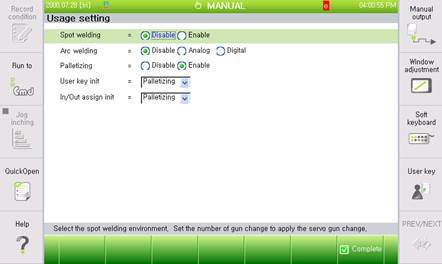
(2) Set “Enable” for “Palletizing”, and set “Palletizing” for “User key init” well as for “In/Out assign init”.
※ Attention
l If “Palletizing” is not set at Usage Setting, the palletizing function cannot be used.
l When it comes to the change of the function at the Usage Setting, it can be possible only after entering the engineer code.
l After the usage is selected, push the『[F7]: Complete』key