7.4. Fieldbus related output signal assign
7.4. Fieldbus related output signal assign
When fieldbus error or fieldbus IDLE (master PLC STOP condition) occurs, you can set the assigned hard-wired output signal to be ON.
(1) Select 『[F2]: System』 → 『2: Control parameter』 → 『2: Input/output signal setting』 → 『4: Output signal assign』from the menu.
(2) Find “Fieldbus error” and “Fieldbus idle” by navigating using the 『[F4]: Previous』 and 『[F5]: Next』key.
(3) Insert the DO signal number that you want on this item, and save it using the『[F7]: Complete』 key.
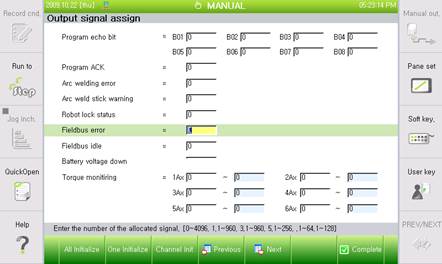
Figure 7.11 Fieldbus related output signal assign