7.2.3.1. Serial port
7.2.3.1. Serial port #1
This function sets the communication information when communicating with serial port #1.
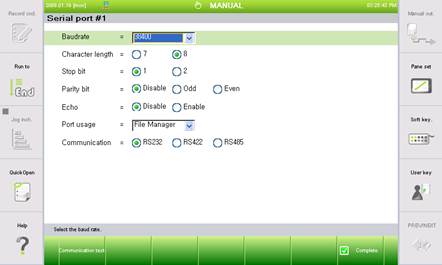
Figure 7.31 Serial port #1 setting menu

l Serial port usage
① File Manager
This is used for saving or opening files (HR-View) for the interface with the computer.
② Sensor
This is used for the usage of receiving the shift data by interfacing with the vision sensor.
③ LVS
This is used for the usage of connecting the laser vision sensor to track the welding line.
④ MODBUS
This is used for the usage of using the MODBUS slave function of Hi5a.
l [F1: Communication test]
This function is to check whether the serial port communication connection is normal. If there is a problem, this function provides procedures for identifying the cause of the problem.